Overview
OPCCOUNT simplifies global payment processes, making cross-border business easy and efficient. It supports multi-currency accounts for both local and international transactions, covering major currencies. Ideal for retail, wholesale, trade, and e-commerce businesses, OPCCOUNT enables efficient domestic and international payments.
 Global Account Fund Management Solution
One account to manage all local and international payments with ease.
💳️ Global Payment Capabilities
Connect to our global account network and transact easily with partners worldwide.
💲 24/7 Smart Forex Service
Real-time connection to global banks, intelligently selecting optimal exchange rates, supporting forex transactions around the clock.
🔥 Instant Global Market Expansion
Leverage our extensive global network to quickly open international accounts and enter target markets seamlessly.
Getting Started
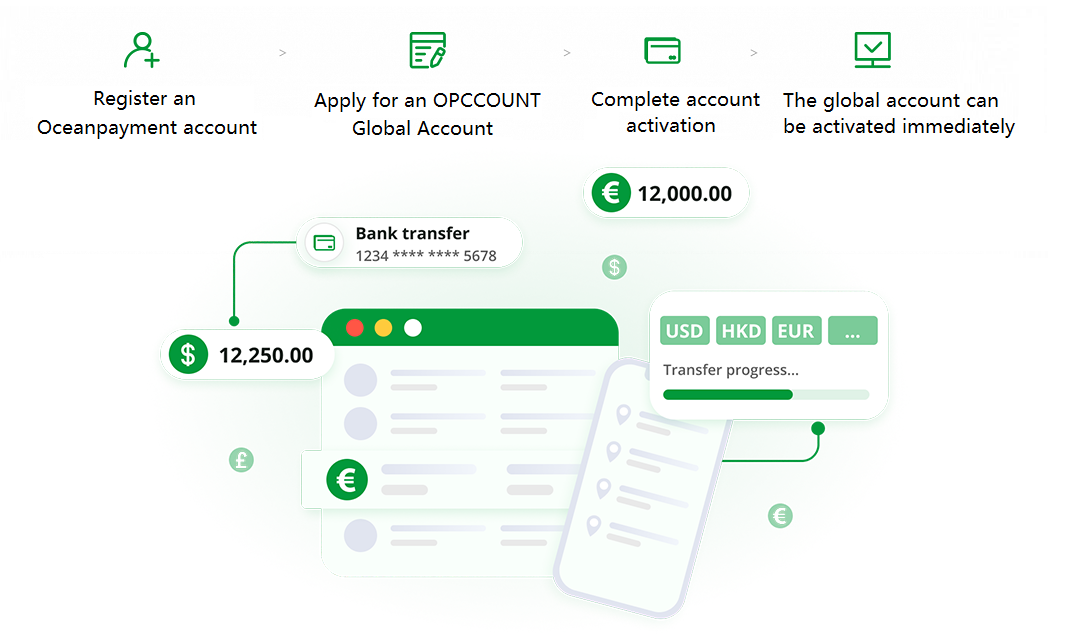
If you don't have an OPCCOUNT account yet, please register a merchant account first.
Manage Global Payments
Multi-Currency Payments
Easily manage over 10 major currencies, including USD, EUR, GBP, AUD, JPY, and more.
Global Virtual Accounts
Access our global network with a simple online application, giving you immediate access to accounts worldwide.
Forex + Global Payments
Support payments in more than 10 currencies to your international partners.
Account-to-Account Transfers
Instant internal transfers within OPCCOUNT with no fees.
Local Payments
Support local payments in 20+ countries and regions, including Southeast Asia.
Bulk Payments
Pay suppliers, advertisers, KOLs, etc., with one-time bulk transfers to global accounts.