Overview
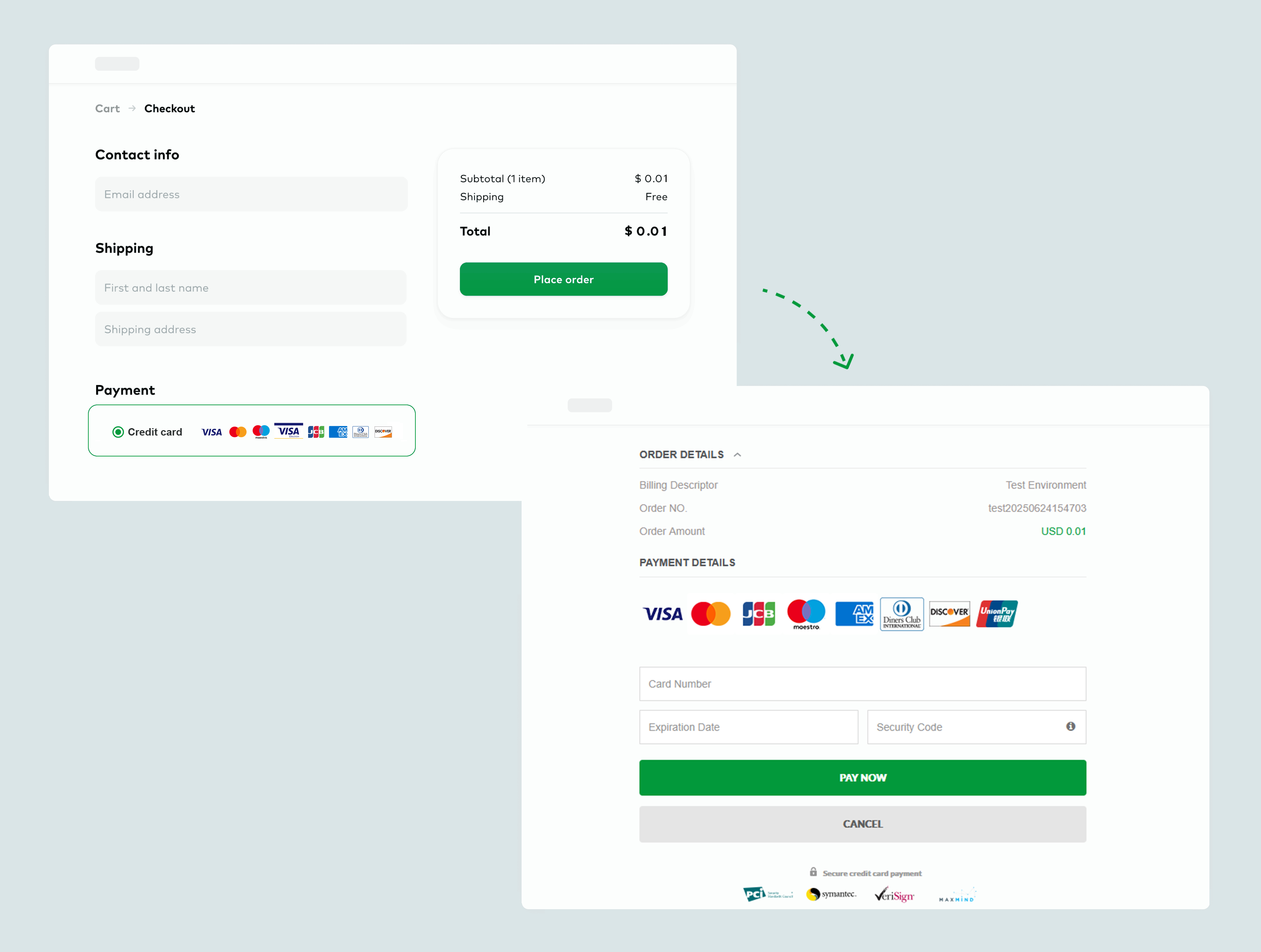
Hosted Checkout: Customers are redirected to Oceanpayment's secure, hosted payment page to complete their transactions. This is the fastest and simplest integration method.
Hosted Checkout
Oceanpayment's Hosted Checkout solution lets you accept payments without dealing with complex integrations or security compliance.
No PCI DSS certification required, reducing technical barriers.
Seamless, fast integration with support for 250+ global payment methods.
Professional payment UI, supporting 24+ languages for credit card payments.
Integration Methods
Oceanpayment offers two Hosted Checkout workflows. Choose the one that best fits your integration needs:
How It Works
- Merchant Control Redirect
- Oceanpayment Auto Redirect
Flowchart
- Initiate transaction by calling the Hosted Checkout API from your server and submitting the required parameters:
cURL -X POST 'https://test-secure.oceanpayment.com/gateway/service/sendTrade' \
-H 'Content-Type: application/x-www-form-urlencoded' \
-d 'account=995149' \
-d 'terminal=99514901' \
-d 'signValue=6b86b273ff34fce19d6b804eff5a3f5747ada4eaa22f1d49c01e52ddb7875b4b' \
-d 'backUrl=https://www.abc.com/back.php' \
-d 'noticeUrl=https://www.abc.com/notice.php' \
-d 'order_number=NO12345678' \
-d 'order_currency=USD' \
-d 'order_amount=0.01' \
-d 'methods=' \
-d 'order_notes=' \
-d 'billing_firstName=test' \
-d 'billing_lastName=test' \
-d 'billing_email=test@gmail.com' \
-d 'billing_phone=13800138000' \
-d 'billing_country=US' \
-d 'billing_state=AL' \
-d 'billing_city=Washington D.C.' \
-d 'billing_address=705A big Road' \
-d 'billing_zip=529012' \
-d 'billing_ip=127.0.0.1' \
-d 'productNum=1' \
-d 'productName=Red Dress' \
-d 'productSku=#001' \
-d 'productPrice=0.01' \
- Retrieve the
pay_url:
<?xml version="1.0" encoding="UTF-8"?>
<respon>
    <account>995149</account>
    <terminal>99514901</terminal>
    <signValue>20303645096FC2AEB64AE39B72A846F4B83BBC90B123C3FB27567F46CDD676E8</signValue>
    <order_number>20230322B2COW03431</order_number>
    <order_currency>HKD</order_currency>
    <order_amount>0.1</order_amount>
    <order_notes></order_notes>
    <payment_id>231205114442682010542</payment_id>
    <pay_url>https://test-secure.oceanpayment.com:443/gateway/service/redirect?pay_id=b6e6cf9d407ce1801f62c9d204c53e512c060ffdcbc56</pay_url>
    <pay_results>1</pay_results>
    <pay_details>0000:Success</pay_details>
</respon>
- Redirect your customer to the pay_url page:
HTTP/1.2 301 Moved Permanently
Location: {pay_url}
- The customer selects a payment method and completes the payment on the Oceanpayment page.
- After payment is completed, the customer is redirected back to your website via
backUrl.
Flowchart
- Merchants use a front-end form to call Hosted Checkout submit parameters:
<form action="https://test-secure.oceanpayment.com/gateway/service/pay" method="post">
  <input type="hidden" name="account" value="995149" />
  <input type="hidden" name="terminal" value="99514901" />
  <input type="hidden" name="order_number" value="NO12345678" />
  <input type="hidden" name="order_currency" value="USD" />
  <input type="hidden" name="order_amount" value="0.01" />
  <input type="hidden" name="signValue" value="egh4fjs2f3h4mc5g3j7676vzva53gfd33dfga1458fe2f12343y" />
  <input type="hidden" name="backUrl" value="http://www.abc.com/result.php" />
  <input type="hidden" name="noticeUrl" value="http://www.abc.com/notice.php" />
  <input type="hidden" name="methods" value="Credit Card" />
  <input type="hidden" name="billing_firstName" value="test" />
  <input type="hidden" name="billing_lastName" value="test" />
  <input type="hidden" name="billing_email" value="test@test.com" />
  <input type="hidden" name="billing_phone" value="0755-123456789" />
  <input type="hidden" name="billing_country" value="US" />
  <input type="hidden" name="billing_city" value="Washington D.C." />
  <input type="hidden" name="billing_address" value="705A big Road" />
  <input type="hidden" name="billing_zip" value="529012" />
  <input type="hidden" name="productSku" value="#001" />
  <input type="hidden" name="productName" value="dress" />
  <input type="hidden" name="productNum" value="1" />
  <input type="submit" value="Submit" />
</form>
- Users select a payment method and make payment on the Oceanpayment page;
- After payment is completed, the user is redirected back to the merchant's website.
Handling Payment Results
In the payment result processing,
- Synchronous return results depend on
backUrl:
- Response
//The form returned via POST:
Array
(
    [response_type] => 0
    [account] => 995149
    [terminal] => 99514901
    [signValue] => F03C3D5154FC2672C5EC05BAD3DDDF0892617CC1517517DCD37E6499AA896D73
    [methods] => Credit Card
    [order_number] => NO12345678
    [order_currency] => USD
    [order_amount] => 0.01
    [order_notes] =>
    [card_number] =>
    [card_type] => null
    [payment_country] => US
    [payment_id] => 221214134817000529042
    [payment_Method] => Credit Card
    [payment_authType] => 2
    [payment_status] => 1
    [payment_details] => 80000:Transaction Approved
    [payment_solutions] => None required.
    [payment_risk] =>
    [payment_amount] => null
    [payment_exchangeRate] => null
    [pay_userId] => null
    [pay_barCode] =>
    [payment_bankInfo] =>
)
- You also need to obtain the transaction information via
noticeUrlWebhook. - View Payment Status Description.
Signature
The signature (signValue) format differs depending on the Hosted Checkout redirect mode you choose. Refer the Signature and Verification section for detailed instructions.