Find Email Template
- In your Shopify store, go to Settings – Notifications and find the menus for Order confirmation, Order edited, and Order refund.
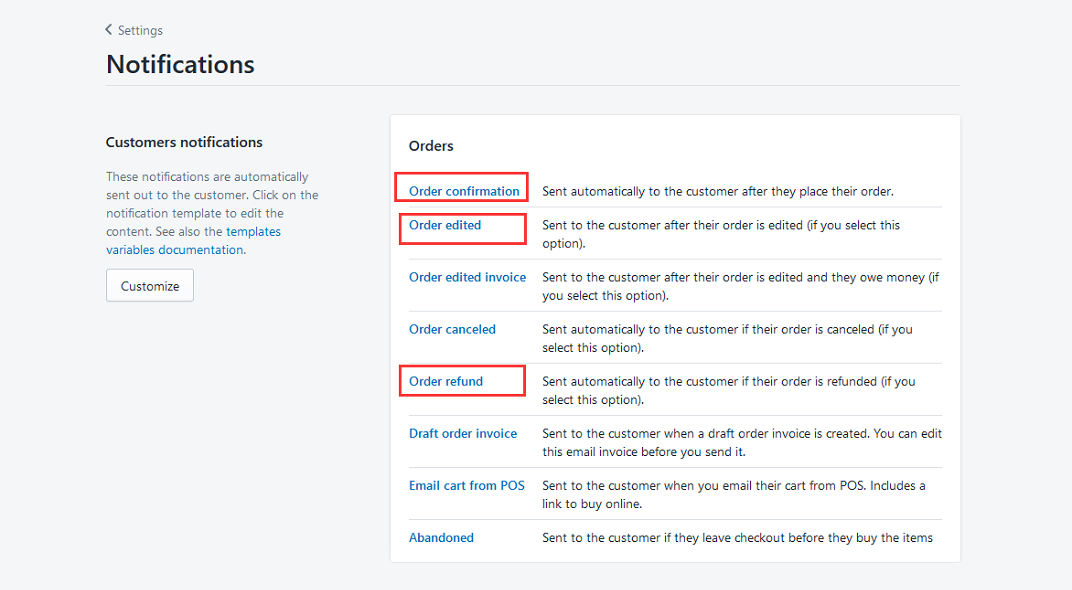
Order confirmation, Order edited modification
- Search (Ctrl+F) for the keyword
gatewayand find the following code location (no need to modify if the code is not found):
{{transaction.gateway|replace:"_",""|capitalize}}
- Replace the above code with:
{%if transaction.gateway|replace:"_",""|capitalize=="Oceanpayment"%}
	Credit/Debit Card
{%else%}
     {{transaction.gateway|replace:"_",""|capitalize}}
{%endif%}
Order refund modification
- Search (Ctrl+F) for the keyword
{{refund_method_title|capitalize}}and find the following code location (no code found, no modification required):
{{refund_method_title|capitalize}}
- Replace the above code with:
{%if refund_method_title|capitalize=="Oceanpayment"%}
    Credit/Debit Card
{%else%}
    {{refund_method_title|capitalize}}
{%endif%}
- Continue searching (Ctrl+F) for the keyword
{{transaction.gateway|replace:"_",""|capitalize}}, and find the following code location (no code found, no modification required):
{{transaction.gateway|replace:"_",""|capitalize}}
- Replace the above code with:
{%if transaction.gateway|replace:"_",""|capitalize=="Oceanpayment"%}
    Credit/Debit Card
{%else%}
    {{transaction.gateway|replace:"_",""|capitalize}}
{%endif%}